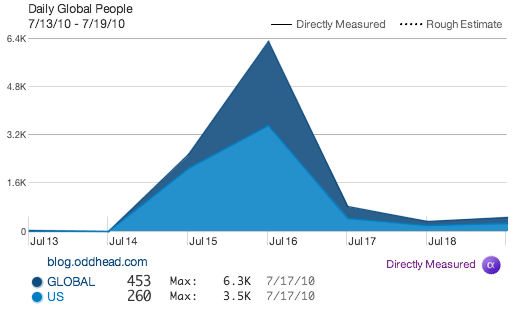
My blog has been hacked yet again. For those keeping track, that’s infection number three. This latest exploit is very similar to the previous one. To humans arriving via browser (e.g., me), the site appears perfectly normal and healthy. Even upon clicking ‘view source’, nothing untoward is revealed. The <title> of my blog is, as always, Oddhead Blog.
However, when Google’s or Bing’s crawlers arrive to index my corner of the web, they see a different <title> altogether — Buy Cheap Cialis Online — and immediately roll their eyes. (Actually even if you run 'curl http://blog.oddhead.com', you’ll see the spam keywords.) The effect of the attack is a kind of reverse cloaking. Cloaking is the black-hat SEO practice of serving legitimate content to crawlers and spam content to people. Here, the spam content is shown to the crawlers and the legitimate content to the people.
Once the crawlers report this appalling information back to their respective mother ships, the search engines have no choice but to delist and demote my blog in their pagerankings. Right now, if you search for or within Oddhead Blog on Google, you’ll see how poorly the bots in Mountain View think of me:
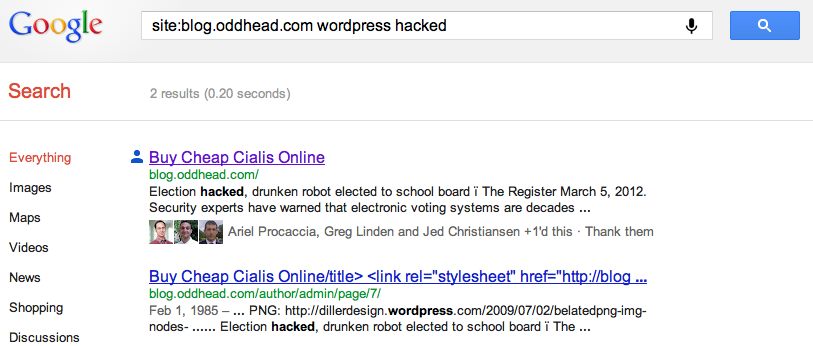
You can hardly find any deep links into my blog by searching Google. For example, try searching for Bem+Wom, my invented term for “BEtter Mousetrap, Word of Mouth”. Even try “Bem+Wom oddhead blog”. You”ll find aggregators republishing my content, but no links to the original source, my blog, anywhere in sight. (Note to self: the Bing results for Bem+Wom are awful.)
Once again I am at a loss to understand my attacker’s motivation. Clearly it’s not to sell Cialis to my users, as they remain blissfully ignorant of any changes. The only benefit to anyone is to remove one relatively obscure blog from the search engine rankings and thus to move the attacker one slot up. Having a blog tangentially about gambling probably puts me into a shady neighborhood of the web, yet reverse-cloaking your competition (even if it can be somewhat automated and strike more than one competitor) seems like an awfully indirect way to improve one’s standing in Google. It’s also possible this is an act of pure vandalism.
So what should I do? Although I partly blame WordPress for writing insecure software, I may end up paying WordPress protection money to make this problem go away. I am seriously considering giving up on self hosting and moving my whole operation to worpress.com’s hosted service, where presumably security is tighter, or at least it’s not my responsibility any more. My web hosting service, DreamHost, may also be partly to blame, yet I like the company and have been quite happy with them in many respects. Any advice, dear reader? WordPress.com? Blogger? Try again and hope the fourth time is the charm? Should I be looking to ditch DreamHost as well?